News
A Beginners Guide to UPS
A UPS (Uninterruptible Power Supply) is a battery backup system that provides instantaneous power during a failure and protects against surges. For businesses, it is the difference between a 1-second flicker and a 4-hour data recovery disaster.
A UPS typically uses a battery to store electrical power. When the main power source fails, the battery kicks in and provides power to the connected equipment. UPS systems can also help to protect equipment from power surges, sags, and spikes, which can damage sensitive electronics. By providing continuous power, a UPS allows users to safely shut down their computers and other devices during a power outage, preventing data loss and corruption.
Whether you are protecting a single server or an entire data centre, understanding how a UPS works is the first step toward guaranteed uptime.
Need an immediate solution? If you are looking for a bespoke power protection plan or a site survey, contact our Engineering Team.
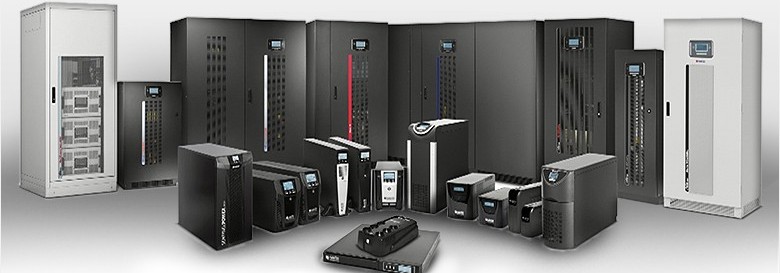
We know that when buying or even considering an uninterruptible power supply (UPS) system, it can be difficult to know which one is right for you.
Some systems are better suited to smaller applications, for example, home offices, whilst others can provide enough power for an entire data centre. If you’re new to this and looking for all the information you need to get started, you’re in the right place!
What is a UPS and Why Do You Need One?
A UPS is a hardware device that provides backup power in case of a blackout or power outage. A blackout can be very disruptive and quite damaging if they happen unexpectedly.
- Instantaneous Power: Providing battery backup the millisecond the mains power fails.
- Power Conditioning: Cleaning the "dirty" electricity from the grid to prevent surges and spikes from frying sensitive components.
The UPS works by providing a limited amount of battery power to your computer in case of a mains failure or disruption. This allows enough time for your computer to shut down correctly or for a generator to come online, if available.
Unfortunately, blackouts can happen to anyone. If it happens to your business, and your computers are unable to shut down properly, it can potentially damage your data in a number of ways.
Why is a UPS important?
Using a UPS can help protect your hardware against damage from unexpected power failures. A UPS device provides backup to your system to ensure that there is no interruption between your computer system and the main power supply.
If your company relies on a computer to store or handle important data, then you should have some form of UPS installed. Larger companies with a data centre will find that it is a necessity rather than a choice to have a UPS.
Compare UPS Solutions & Service Requirements
| Requirement | Offline / Standby | Line-Interactive | Online Double-Conversion |
| Best For... | Home Offices, PCs, & Small Peripherals. | Small Business Servers & Network Racks. | Mission-Critical Data Centres & Medical Gear. |
| Protection Level | Basic Surge & Power Failure. | Voltage Regulation & Power Sag protection. | Total Protection: Continuous clean power. |
| Transfer Time | 5–10ms (Small delay). | 2–6ms (Minimal delay). | 0ms (Instantaneous). |
| Battery Life | 3–5 Years. | 3–5 Years. | 5–10 Years (System-dependent). |
| Maintenance | User-replaceable batteries. | Annual visual inspection. | Critical: Professional 24/7 Monitoring. |
| Recommended Service | UPS Battery Replacement | Annual Health Check | Full Maintenance Contract |
Choosing the Right Technology for Your Service Level
When it comes to choosing a UPS, there are generally three different versions that you will come across. There is no one UPS type that is suitable for all applications - different UPSs are appropriate for different applications, so it’s important to get the right fit for your business.
Standby UPS is the simplest and most common type of UPS for personal computers. Offering high efficiency, at a small size and low cost!
Line interactive UPS is the most common design used for small businesses, as they are highly efficient and offers lower running costs than online systems. They also offer enhanced power protection over basic off-line designs as they provide additional line conditioning.
Online UPS is far more common among medium to large-sized operations and is versatile in its scope. Although a more expensive system, on-line UPS’s also more reliable as the inverter is running continuously, offering a greater level of protection against surges, spikes, electrical noise and harmonics, as well as complete power failures.
UPS systems are a unique requirement depending on the individual or company, but that doesn’t mean choosing which one you should implement has to be a tricky decision. The three key areas you need to consider when choosing a system are…
- Sizing – Make sure you size your UPS correctly to have enough power to supply your critical load in case of an outage.
- Single-phase vs 3-phase power – Find out from your facilities manager, utility provider or a qualified electrical contractor whether your business is served by single or 3-phase power.
- Scalability – A mistake often made is choosing a UPS system without considering future growth, meaning the UPS will need replacing before the end of its life.
If it’s a large scale setup that you’re looking for, we would recommend that you get in touch with us so that we can provide you with a bespoke recommendation.
What happens if the UPS fails?
The worst case scenario for an IT manager is that a safety device, planned to protect the IT structure in the event of a failure, fails. Although it is unlikely, it can happen with UPS systems, leading to revenue loss and disastrous business consequences. While the risk is small, it is a risk not worth taking, which is why we would recommend implementing an extra layer into the business, such as a Bypass Switch.
UPS systems are very reliable and when you purchase through Adept Power, your UPS will be covered by the manufacturer’s warranty for replacement parts and we can assist with ongoing maintenance to ensure reliability. However, UPS failures can still occur and you can reduce the risk of this by ensuring…
- Appropriate UPS sizing
- Correctly installed & designed UPS
- Ideal UPS environmental conditions
- Satisfactory UPS maintenance
If your company or organisation requires a UPS power supply to operate efficiently, contact Adept Power. As well as designing and supplying bespoke uninterruptible power supplies to businesses, we can also supply replacement UPS batteries, bypass switches, diesel generators and offer maintenance services.
Get in touch today to discuss a potential project on 01264 351 415 or you can contact us via our contact page. No matter the type of UPS you’re looking for, we will be able to offer you expert advice and assistance!